
import pyvips
from PIL import Image
import time

def convert_to_webp_and_save_with_pyvips(image, path):
    image.webpsave(path)

def convert_to_thumbnail_and_save_with_pyvips(image, path, size=(150, 150)):
    scale = min(size[0] / image.width, size[1] / image.height)
    thumbnail = image.resize(scale)
    thumbnail.webpsave(path)

def test_lambda_function_with_pyvips():
    tmp_file_key = 'img4.JPG'
    download_path = f'./tmp/{tmp_file_key}'
    thumbnail_path = f'./tmp/{tmp_file_key}_thumbnail.webp'
    webp_path = f'./tmp/{tmp_file_key}.webp'
    print("download file finished")
    original_image = pyvips.Image.new_from_file(download_path).autorot()
    print("open image finished")
    convert_to_webp_and_save_with_pyvips(original_image, webp_path)
    print("convert to webp finished")
    convert_to_thumbnail_and_save_with_pyvips(original_image, thumbnail_path)
    print("convert to thumbnail finished")

if __name__ == '__main__':
    test_lambda_function_with_pyvips()
속도 차이 대상 파일 : 3024 x 4032 2.9mb 짜리 사진 파일 pillow
Line #    Mem usage    Increment  Occurrences   Line Contents
=============================================================
    23     47.0 MiB     47.0 MiB           1   @profile
    24                                         def test_lambda_function_with_pillow():
    25     47.0 MiB      0.0 MiB           1       tmp_file_key = 'img4.JPG'
    26     47.0 MiB      0.0 MiB           1       download_path = f'./tmp/{tmp_file_key}'
    27     47.0 MiB      0.0 MiB           1       thumbnail_path = f'./tmp/{tmp_file_key}_thumbnail.webp'
    28     47.0 MiB      0.0 MiB           1       webp_path = f'./tmp/{tmp_file_key}.webp'
    29     47.0 MiB      0.0 MiB           1       print("download file finished")
    30     48.0 MiB      1.0 MiB           1       original_image = Image.open(download_path)
    31     48.0 MiB      0.0 MiB           1       print("open image finished")
    32    112.8 MiB     64.8 MiB           1       convert_to_webp_and_save(original_image, webp_path)
    33    112.8 MiB      0.0 MiB           1       print("convert to webp finished")
    34    143.6 MiB     30.8 MiB           1       convert_to_thumbnail_and_save(original_image, thumbnail_path)
    35     97.2 MiB    -46.4 MiB           1       original_image.close()
    36     97.2 MiB      0.0 MiB           1       print("convert to thumbnail finished")
pyvips
Line #    Mem usage    Increment  Occurrences   Line Contents
=============================================================
    38     47.0 MiB     47.0 MiB           1   @profile
    39                                         def test_lambda_function_with_pyvips():
    40     47.0 MiB      0.0 MiB           1       tmp_file_key = 'img4.JPG'
    41     47.0 MiB      0.0 MiB           1       download_path = f'./tmp/{tmp_file_key}'
    42     47.0 MiB      0.0 MiB           1       thumbnail_path = f'./tmp/{tmp_file_key}_thumbnail.webp'
    43     47.0 MiB      0.0 MiB           1       webp_path = f'./tmp/{tmp_file_key}.webp'
    44     47.0 MiB      0.0 MiB           1       print("download file finished")
    45     48.4 MiB      1.4 MiB           1       original_image = pyvips.Image.new_from_file(download_path)
    46     48.4 MiB      0.0 MiB           1       print("open image finished")
    47    104.0 MiB     55.6 MiB           1       convert_to_webp_and_save_with_pyvips(original_image, webp_path)
    48    104.0 MiB      0.0 MiB           1       print("convert to webp finished")
    49    104.9 MiB      0.9 MiB           1       convert_to_thumbnail_and_save_with_pyvips(original_image, thumbnail_path)
    50    104.9 MiB      0.0 MiB           1       print("convert to thumbnail finished")
2/3으로 줄어듦. 속도도 1.668149471282959 → 1.5506901741027832로 0.1초 줄어듦. 대신 pyvips는 운영체제의 libvip를 사용하기 때문에 따로 설치해줘야됨. 컨테이너 기반의 lambda로 변경
이미지 회전 문제
이미지를 가져올때 회전되어 가져옴. 이는 exif 태그를 읽지 않아서 발생하는 문제. pillow에서는 ImageOps.exif_transpose(image) 를 쓰면 해결되고 pivips에서는 이미지를 열때 image = pyvips.Image.new_from_file(download_path).autorot() 을 쓰면 됨
근데 막상 lambda 올리니까
pyvips보다 pillow가 훨씬 빠르다. pyvips가 맥에서 더 잘 동작하나봄?
pillow
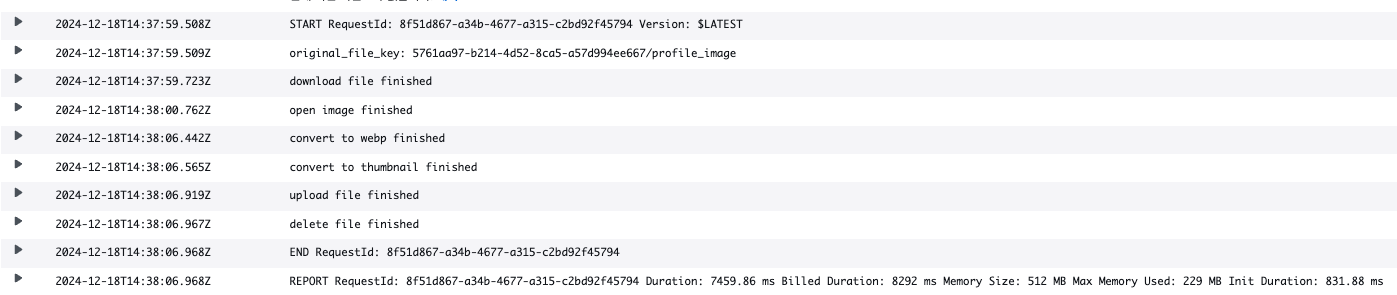 pyvips. 줜나게 형편없는 성능을 자랑하는걸 볼 수 있다
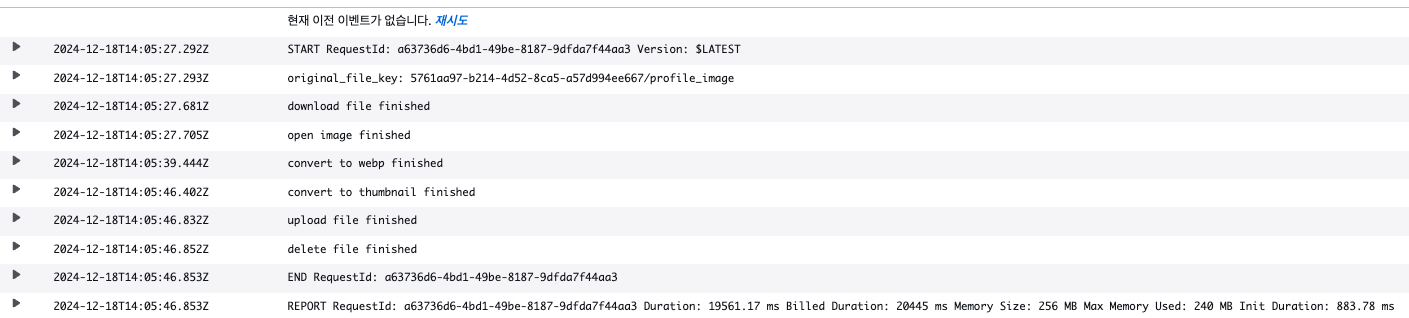 왜일까. 나중에 따로 공부해보자.